SAML認証の設定
セキュリティアサーションマークアップ言語(SAML)は、ユーザーがログイン時にパスワードを入力せずに済むようにするサインイン方法です。AssetExplorer CloudはSAML 2.0をサポートしており、フェデレーション型ID管理ソリューションと統合することで、ログインの認証と認可を行います。例えば、ユーザーがActive Directoryの認証情報を使用してAssetExplorer Cloudにログインできるように設定できます。
SAML認証は、以下の2つのエンティティで構成されます。
- サービスプロバイダー(SP)(AssetExplorer Cloud)
- アイデンティティプロバイダー(IdP)(ADFS、Okta)
AssetExplorer CloudにおけるSAMLは、どのように役立ちますか?
- Active Directory統合/LDAP認証を使用して、ユーザーがITヘルプデスクに簡単かつ安全にアクセスできるようにします。
- IT部門がユーザー認証を行い、アプリケーションへのアクセスを一元的に制御できるよう支援します。
- ヘルプデスクユーザーの管理におけるパスワード管理とセキュリティ上の負担を軽減します。
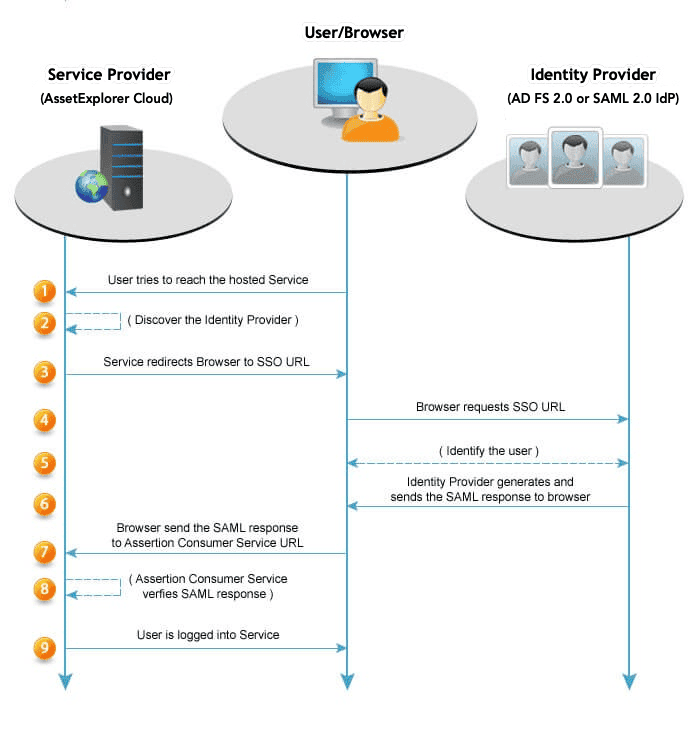
SAML認証を有効化
必要な役割:組織管理者
ステップ1:ドメイン検証
組織で使用しているドメインを検証します。
ステップ2:サブドメインまたはカスタムドメインの設定
カスタムURLを使用してAssetExplorerにアクセスするために、カスタムドメインURLまたはサブドメインを設定します。customer-sdpod-am1.csez.zohocorpin.com:3104 を指すCNAMEエイリアスを必ず追加します。
ステップ3:IDプロバイダーのインストール
ネットワークにSAML 2.0準拠のIDプロバイダーをインストールします。すべての認証要求は、このIDプロバイダーに転送されます。IDプロバイダーは、Active
Directory/LDAP/カスタム認証を実行してユーザーを検証できます。
他のSAML 2.0準拠のIDプロバイダーを使用している場合
- Zohoから送信された認証要求は、SAML認証要求で確認できます。
- 期待されるアサーション応答は、期待されるSAMLレスポンスで確認できます。
ステップ4:SAML構成
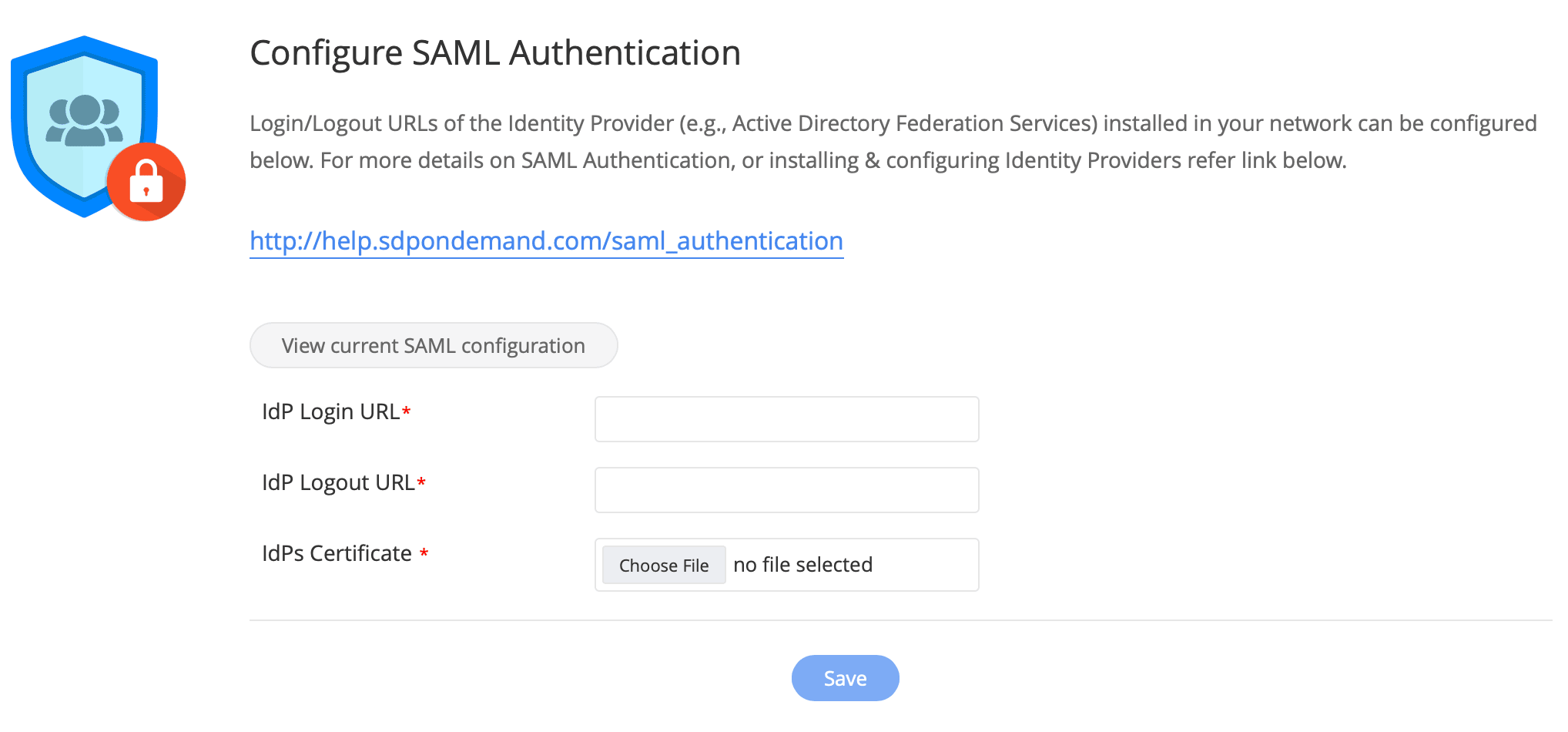
- [ESMディレクトリ] → [SAML認証]に移動し、[SAML認証の設定]の下のフィールドに入力します。
- ログインおよびログアウトの要求が適切にリダイレクトされるように、IDプロバイダーのログインURLとログアウトURLを指定します。
- ManageEngineがIDプロバイダーから送信されたSAML応答を復号化できるように、IDプロバイダーの証明書を提供します。
- [保存]をクリックします。
組織のユーザーが設定済みのサブドメインまたはカスタムドメインを使用してAssetExplorer Cloudにアクセスすると、認証のためにネットワーク内にインストールされているIDプロバイダーにリダイレクトされます。認証が成功すると、ユーザーはAssetExplorer Cloudにリダイレクトされ、ログインされます。
- SAML認証が設定されている場合、組織のユーザーはサブドメインまたはカスタマイズされたドメイン経由でのみAssetExplorer Cloudにアクセスする必要があります。
- IdPのURLを変更する場合は、証明書を再生成し、SAML設定のログイン/ログアウトURLを更新した上で、新しい証明書をアップロードする必要があります。
SAML 認証要求
zylker.comが検証済みのドメインであり、idp-w2k8がIDプロバイダーがインストールされているシステムであると仮定します。
- <samlp:AuthnRequest xmlns:saml="urn:oasis:names:tc:SAML:2.0:assertion"
- xmlns:samlp="urn:oasis:names:tc:SAML:2.0:protocol"
- ID="_abe4735eceae4bd49afdb3f254dc5ea01359616"
- Version="2.0"
- IssueInstant="2013-01-31T07:18:15.281Z"
- ProtocolBinding="urn:oasis:names:tc:SAML:2.0:bindings:HTTP-POST"
- ProviderName="Zoho"
- IsPassive="false"
- Destination="https://idp-w2k8/adfs/ls"
- AssertionConsumerServiceURL="https://accounts.zoho.com/signin/samlsp/<orgid>"
- <saml:Issuer>zoho.com</saml:Issuer>
- <samlp:NameIDPolicy AllowCreate="true" />
- </samlp:AuthnRequest>
期待されるSAMLレスポンス
- <?xml version="1.0" encoding="UTF-8"?>
- <samlp:Response ID="_38563ef5-2341-4826-94f2-290fca589a51"
- Version="2.0"
- IssueInstant="2013-01-31T07:19:18.219Z"
- Destination="https://accounts.zoho.com/signin/samlsp/<orgid>"
- Consent="urn:oasis:names:tc:SAML:2.0:consent:unspecified"
- InResponseTo="_abe4735eceae4bd49afdb3f254dc5ea01359616"
- xmlns:samlp="urn:oasis:names:tc:SAML:2.0:protocol" >
- <Issuer xmlns="urn:oasis:names:tc:SAML:2.0:assertion">http://idp-w2k8/adfs/services/trust</Issuer>
- <samlp:Status>
- <samlp:StatusCode Value="urn:oasis:names:tc:SAML:2.0:status:Success" />
- </samlp:Status>
- <Assertion ID="_c42ed101-0051-48ad-a678-8cb58dee03f6"
- IssueInstant="2013-01-31T07:19:18.219Z"
- Version="2.0"
- xmlns="urn:oasis:names:tc:SAML:2.0:assertion" >
- <Issuer>http://idp-w2k8/adfs/services/trust</Issuer>
- <ds:Signature xmlns:ds="http://www.w3.org/2000/09/xmldsig#">
- <ds:SignedInfo>
- <ds:CanonicalizationMethod Algorithm="http://www.w3.org/2001/10/xml-exc-c14n#" />
- <ds:SignatureMethod Algorithm="http://www.w3.org/2000/09/xmldsig#rsa-sha1" />
- <ds:Reference URI="#_c42ed101-0051-48ad-a678-8cb58dee03f6">
- <ds:Transforms>
- <ds:Transform Algorithm="http://www.w3.org/2000/09/xmldsig#enveloped-signature" />
- <ds:Transform Algorithm="http://www.w3.org/2001/10/xml-exc-c14n#" />
- </ds:Transforms>
- <ds:DigestMethod Algorithm="http://www.w3.org/2000/09/xmldsig#sha1" />
- <ds:DigestValue>wlE4Jf0Z8Z+2OyWE69RRH81atZ8=</ds:DigestValue>
- </ds:Reference>
- </ds:SignedInfo>
- <ds:SignatureValue>Y3izuExs6/EDebT9Q4U3qbL6Q==</ds:SignatureValue>
- <KeyInfo xmlns="http://www.w3.org/2000/09/xmldsig#">
- <ds:X509Data>
- <ds:X509Certificate>MIIC7jCCAdagAwIBAgIQVsvKLeIHJYVEYQONFS3p3zANBgkqhkiG9w0BAQUFADAgMR4+zaLeWShiGw==</ds:X509Certificate>
- </ds:X509Data>
- </KeyInfo>
- </ds:Signature>
- <Subject>
- <NameID Format="urn:oasis:names:tc:SAML:1.1:nameid-format:emailAddress">user1@zylker.com</NameID>
- <SubjectConfirmation Method="urn:oasis:names:tc:SAML:2.0:cm:bearer">
- <SubjectConfirmationData InResponseTo="_abe4735eceae4bd49afdb3f254dc5ea01359616"
- NotOnOrAfter="2013-01-31T07:24:18.219Z"
- Recipient=""https://accounts.zoho.com/signin/samlsp/<orgid>" />
- </SubjectConfirmation>
- </Subject>
- <Conditions NotBefore="2013-01-31T07:17:18.203Z"
- NotOnOrAfter="2013-01-31T07:17:19.203Z" >
- <AudienceRestriction>
- <Audience>zoho.com</Audience>
- </AudienceRestriction>
- </Conditions>
- <AuthnStatement AuthnInstant="2013-01-31T07:19:18.110Z"
- SessionIndex="_c42ed101-0051-48ad-a678-8cb58dee03f6" >
- <AuthnContext>
- <AuthnContextClassRef>urn:oasis:names:tc:SAML:2.0:ac:classes:PasswordProtectedTransport</AuthnContextClassRef>
- </AuthnContext>
- </AuthnStatement>
- </Assertion>
- </samlp:Response>